Recipe and kitchen Shorts
AI Cooking Video Generator
This AI cooking video generator turns a dish idea into a finished vertical Short that follows the food from raw ingredients to the plate, with the kitchen's own sounds kept up front.
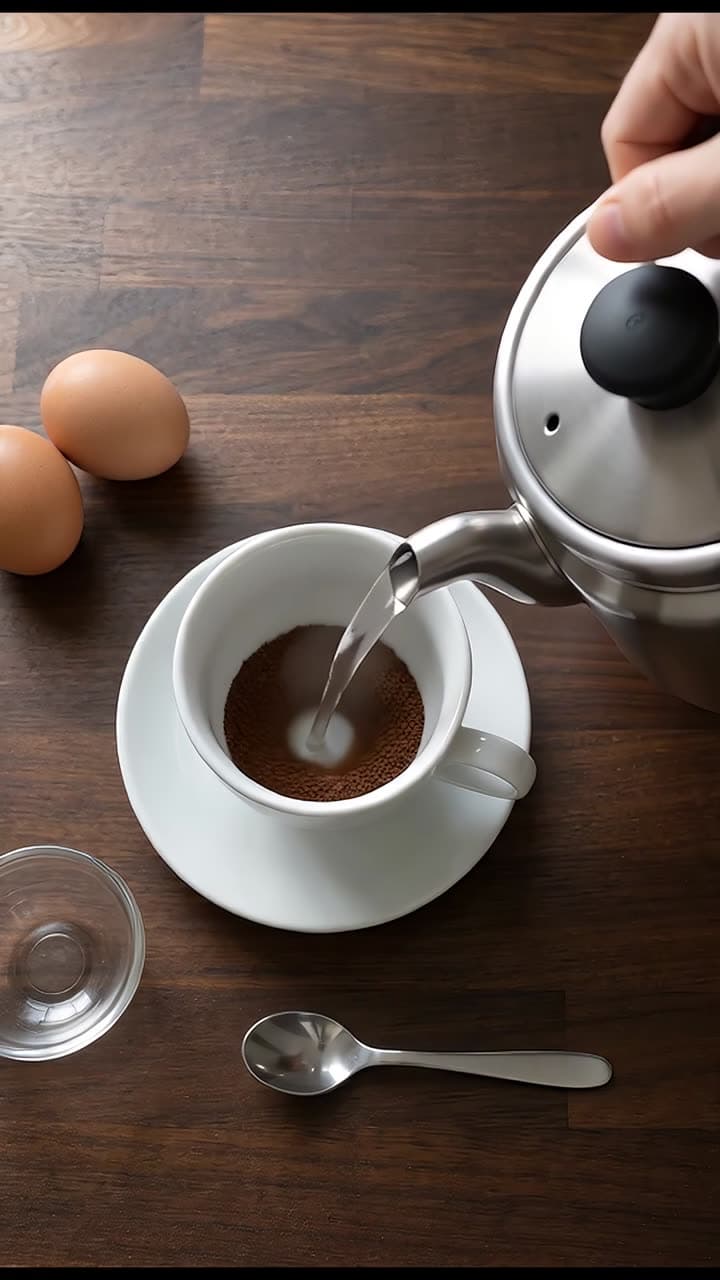
Typed idea
“making a hot cup of coffee and then adding 2 eggs in it.”
Made with FacelessVideoMaker
Watch finished Shorts in these formats.
Open any format to watch the finished Short and read the idea it came from.
Motion is reduced. Scroll horizontally to browse the formats.
What an AI cooking video generator films
A cooking Short holds attention because something keeps changing: dough comes together, butter melts, sugar darkens, a crust forms. The Cooking ASMR format shows that change from close in, with the work surface in view and the sounds of the kitchen in front, so there is no voice talking over the sizzle. Think of it as a cooking ASMR video generator that happens to end with a finished dish.
You describe the dish, and the format plans the shots, makes them, and joins them into one vertical video. It shows how food looks while it is being made, which is different from a tested recipe, so the quantities and timings in a clip should not be copied as instructions. Treat each clip as a picture of a dish, and keep your written recipe for the caption or the description.
Real clips from this format include fresh fettuccine made from flour and eggs, a salmon fillet searing in a pan, sugar turning to caramel, a croissant dough sculpture, and a tiny kitchen preparing rajma chawal. Some run in reverse, so a pizza seems to un-bake or pasta seems to un-cook, and that is a style you can ask for in the sentence.
Formats
Six dishes that suit an AI cooking video maker
These dishes show a clear change from start to finish, which gives a short clip a beginning, a middle, and a result.
Pasta and doughs
Flour, eggs, and water come together, get rolled and cut, and end as something you could eat.
Pan sears and fries
A fillet or a cutlet hits hot oil, and the surface turns golden while the sound builds.
Sugar and sweets
Granulated sugar melts, darkens, and pours, which makes caramel one of the easiest changes to read at a glance.
Bakes and layers
Pastry folds, rises, and browns in the oven, and the finished piece is the reward at the end.
Miniature kitchens
A tiny stove, tiny pans, and a full meal made at toy scale give the clip a charm of its own.
Reverse cooking
The dish un-cooks itself back to raw ingredients, which makes a familiar recipe feel new and invites a second watch.
From a dish idea to a finished cooking Short
The path is short: describe the dish, choose how it sounds, check the price, and watch it arrive.
- 01
Describe the dish
Say what is being cooked and how it should end, such as thick-cut potatoes frying until deep golden in a cast iron pan.
- 02
Pick sound and length
Kitchen sound is the usual choice, and the length menu only lists what the Cooking ASMR format can make.
- 03
Look at the price
You see the price for your choices before anything is built, and credits return if a Short fails or is cancelled.
- 04
The finished Cooking ASMR Short, with its title, description, and tags ready to edit.
Review the Short
The finished video appears in Your Shorts, where you can watch it and send it on when you are happy.
Try it with your own idea
Describe the dish so the kitchen scene holds together
An AI recipe video generator can only show what the sentence gives it, so a few concrete details do most of the work.
- 01
Name the dish and its finish
Golden fries, a glossy sauce, or a charred crust tell the clip what the last frame should look like.
- 02
Pick one cooking method
Frying, folding, simmering, or baking each have their own motion, and one method keeps the clip from feeling busy.
- 03
Describe the surface and the tools
A wooden board, a copper pan, or a marble counter sets the scene and gives the camera something steady to follow.
- 04
Mention the sound you want
Sizzle, chop, pour, and crackle are easy to picture, and naming one steers the clip toward it.
- 05
Stay close to the food
A tight view of the pan or the dough shows texture better than a wide shot of the whole kitchen.
Cooking ASMR or Action
Both formats can show a task from start to finish, so here is how they differ.
| Topic | Cooking ASMR | Action |
|---|---|---|
| Subject | Food being prepared, from raw ingredients to a finished dish. | Any hands-on task, such as a repair or a craft. |
| Sound | The kitchen's own sounds come first. | Impacts, tools, and handling noises. |
| Best for | Recipes, baking, and sauces. | Builds, fixes, and step-by-step work. |
Sound, a reference photo, and length
Sound is picked in one place, the review step, where natural kitchen sound is the default for Cooking ASMR and a voiceover, a music bed, or silence are the alternatives. If you want slow satisfying textures that are not food, such as soap or sand, the AI ASMR video generator is the better fit.
You can add one reference image to start from a look you already have, such as a photo of your own plate or pan. The image is optional and gets cropped to 9:16, and you should only upload pictures you have the right to use. Most first clips need only a sentence.
Each Short is a vertical 9:16 video, and the price shown is for the length and sound you picked. Cooking clips also pair well with a travel angle, so the AI travel vlog generator is worth a look for street food and market scenes.
Start from an idea, with the format already picked
Each idea opens the composer with its format chosen, and you can change either before anything is made.
Formats that fit these ideas
Not quite what you need?
These pages cover the same tool for a narrower goal.
What to know before you create
What is an AI cooking video generator?
Can an AI food video maker show a real recipe?
Is this an AI recipe video generator or a recipe app?
Do the cooking videos have sound?
Can I make a cooking video in reverse?
How long can a cooking clip be?
How much does a cooking Short cost?
Describe the dish and watch it cook
One sentence about a dish is enough to start a cooking Short. FacelessVideoMaker plans the shots, keeps the kitchen sounds, shows the price first, and returns the finished clip to Your Shorts.